
A WhatsApp booking bot for homestays in Kerala: Munnar, Wayanad, Alleppey and Kochi
How Kerala homestays can answer guests on WhatsApp in Malayalam, Manglish, Hindi or English, check real rooms, and take bookings with an advance.
5 min readBy Gokul Hans V · Founder, Agent24
On this page
A homestay in Munnar, Wayanad, Vagamon, Alleppey or Fort Kochi gets most of its direct bookings on WhatsApp. The same questions arrive every day, often late at night and often in three languages: "Room available on Saturday?", "Rate for 2 adults and 1 kid?", "Breakfast included?", "Pickup from Aluva station?", "Couples allowed?"
An AI agent can answer all of them and take the booking, but only if it knows your real rooms, your rates and your house rules. This guide shows what to set up so it gets them right.
What Kerala guests ask, and how the agent should answer
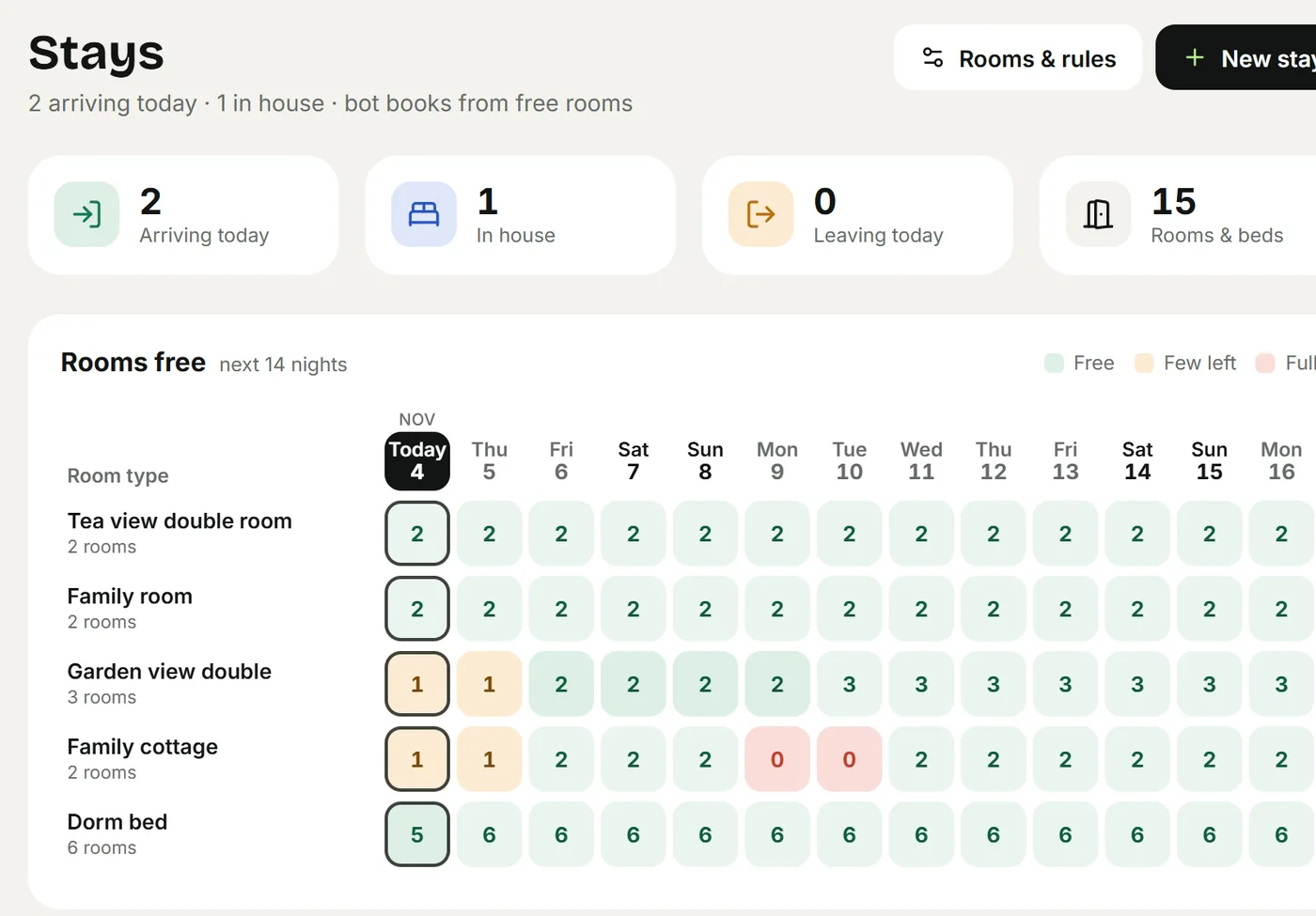
- Availability for a date. The agent checks your rooms for those nights, not a guess. If one room is free and the guest needs two, it says so and offers what is free.
- The price for their group. Weekday and Friday / Saturday rates, extra adults, children by age, extras like breakfast or a jeep pickup, and tax. The total comes from your rates every time, so the agent never adds it up wrong.
- Policies. Couples, ID at check-in, pets, alcohol, quiet hours, check-in and check-out times. Your answers become rules the agent follows.
- Directions and photos. Your Google Maps link, the room photos and a short guide to the last kilometre when the road is tricky.
- "Can I talk to the owner?" The agent hands the chat to you and you're told at once.
Languages: Malayalam, Manglish, Hindi and English
Guests from Kerala often write Malayalam in English letters ("room undo saturday?"). Guests from Bengaluru, Chennai or the north write English, Tamil or Hinglish, and foreign guests write their own language. The agent answers in the language and script each guest writes in. Voice notes are transcribed and answered too.
To make it sound like you, upload a WhatsApp chat export or type a usual conversation under Agent → How you talk. The agent learns your greetings and the words you use, not your guests' numbers.
Set it up in an afternoon
- Sign up and pick "Homestay & resort" as the category. The Stays module turns on, and the policy questions for stays come up: couples, ID, check-in times.
- Add your room types under Stays → Rooms & rules: how many of each, how many people they sleep, the nightly rate, the weekend rate, and the child price. A dorm bed or a whole villa works the same way.
- Add seasons: a higher rate for the Christmas and New Year weeks, Onam or summer holidays, a lower one in the monsoon, as a percentage up or down.
- Add extras: breakfast per guest per night, a pickup per stay, a campfire, a plantation walk.
- Set tax: the GST rate, whether it is included in your rates or added, and a higher rate above a nightly price if your tariff crosses the slab.
- Connect your Airbnb and Booking.com calendars, so nights booked there are taken here too, and paste Agent24's calendar link back into them.
- Choose who confirms: the agent books on its own, or it takes a request and your team confirms.
- Teach it the rest under Teach your agent: your brochure, the house rules, the route from the bus stand, nearby places to visit.
Then ask the test chat your guests' real questions before you connect WhatsApp. Rooms and stays and Teach your agent cover each screen.
Advances and reminders
Most Kerala homestays take an advance before the dates are held. Connect your own Razorpay under Settings → Payments (on Pro), and the agent sends a payment link for the full amount or an advance percentage. When the guest pays, the stay is confirmed and the guest is told on WhatsApp. The day before check-in, the guest gets a reminder with Confirm and Cancel buttons. See Payments and payment links.
Your own website, with a Rooms section
Every business gets a free page at its own name on agent24.in, with your rooms, photos, Call and WhatsApp buttons and a booking form. Put the link in your Instagram bio and Google Maps listing, so guests who find you there can book without waiting for a reply. See Website and chat.
Mistakes to avoid
- Letting the bot quote prices from a PDF. Put the rates in the room setup, so totals come from the real numbers.
- Forgetting the OTA calendars. A night sold on Airbnb must disappear from WhatsApp too.
- Leaving the policies vague. If you don't allow unmarried couples, or need ID from every adult, say it in the policy questions; the agent says it politely and the same way every time.
- Never taking over. Read the hand-overs for the first week. They tell you what to teach next.
More on homestays: Agent24 for homestays, Homestay bookings on WhatsApp and Best WhatsApp AI agents for homestays and small hotels.
Frequently asked questions
Can the bot reply in Malayalam?
Yes. It answers in the language each guest writes in, including Malayalam script, Manglish in English letters, Hindi, Tamil and English, and it transcribes voice notes.
Will it double-book a room that is already sold on Airbnb?
Not when the Airbnb and Booking.com calendars are connected. Their bookings take a room for those nights, and the calendars sync on their own and when you tap Sync now.
Can I check each booking before it is confirmed?
Yes. Set the rules so the agent takes a request and your team confirms it. The guest is told when you confirm, move or cancel the stay.
Do I need the WhatsApp Business API?
To let the agent answer on WhatsApp, yes: you connect your number to the WhatsApp Business Platform from Settings. Until then, guests can still book from the booking form on your free website.
Does it handle GST?
Yes. You set the GST rate, whether it is included or added, and a higher rate above a nightly price, and every quote and booking shows it.
Keep reading
- BlogBest WhatsApp AI agents for homestays and small hotels (2026)WhatsApp AI agents for homestays, guesthouses and small hotels compared: which ones check real room availability and book, what they cost, and how to test them.
- BlogHomestay bookings on WhatsApp without overbooking (even with Airbnb and Booking.com)How homestays and small resorts can answer enquiries 24/7, quote the right price, take an advance and keep Airbnb and Booking.com calendars in sync.
- BlogAn AI chatbot that speaks Malayalam, Hindi, Manglish and Hinglish: why it mattersCustomers write the way they talk, in mixed languages and voice notes. Here's why language support decides whether a WhatsApp bot gets used, and what to look for.
- Who it's forWhatsApp booking for homestays and resortsAn AI agent that answers "is it free on the 14th?", quotes the stay, takes the advance on WhatsApp and never overbooks, even with Airbnb and Booking.com.